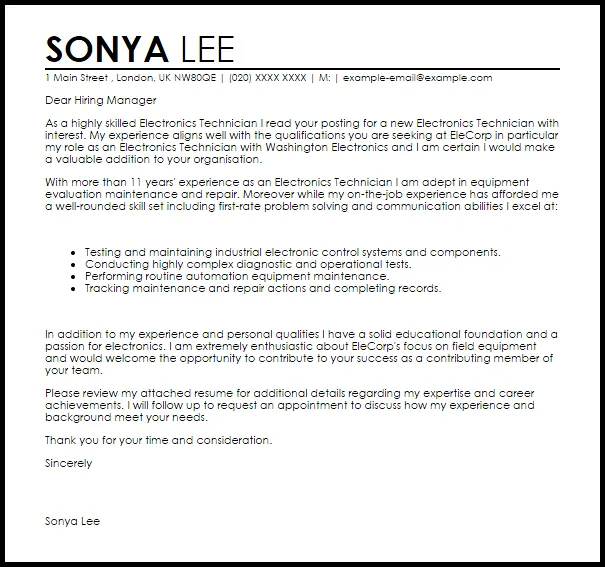
What is an Electronic Cover Letter
An electronic cover letter is a digital version of the traditional cover letter, designed for online job applications. It serves as your introduction to a potential employer, providing context to your resume and highlighting your key qualifications and skills. Unlike a physical letter sent through the mail, an electronic cover letter is typically submitted as a file attachment (PDF or Word document) or pasted directly into the body of an email. The purpose remains the same to make a strong first impression and persuade the hiring manager to consider your application. When applying for jobs online, an electronic cover letter is often the first impression you make, which is why it’s crucial to write it correctly. A well-crafted electronic cover letter sets you apart from other candidates and increases your chances of landing an interview. It’s a crucial element of your job application package.
Why Electronic Cover Letters Are Important
Electronic cover letters are not just important; they are, in many cases, essential for modern job applications. In today’s digital landscape, the majority of job applications are submitted online, making the electronic cover letter a critical tool for job seekers. It provides an opportunity to personalize your application and demonstrate your understanding of the role and the company. Moreover, an electronic cover letter allows you to expand upon your resume, offering a narrative that showcases your personality, communication skills, and career aspirations. It offers a way to bridge the gap between the bullet points of your resume and the human side of your professional identity. Neglecting to include a cover letter can signal a lack of attention to detail or genuine interest in the position. This can lead to your application being overlooked, even if you possess the necessary qualifications. A well-written cover letter demonstrates professionalism and a proactive approach to your job search, which is highly valued by employers.
Key Components of a Perfect Electronic Cover Letter

Crafting a perfect electronic cover letter involves several key components working in harmony to create a compelling introduction. Each section plays a vital role in conveying your qualifications, enthusiasm, and suitability for the position. Pay attention to details, structure, and tone, to ensure your letter is professional, engaging, and tailored to the specific job application. The following sections will guide you through the essential elements of an effective electronic cover letter. From contact information to the closing, each part contributes to making a positive impression on the hiring manager and increasing your chances of securing an interview. Proper formatting and clear, concise language are also essential for readability and impact. Your ability to communicate effectively in writing will be assessed, so every word counts. It’s a chance to display your communication skills.
Contact Information
Start your electronic cover letter with your full name, address, phone number, and professional email address. This information allows the employer to easily contact you if they are interested in your application. Ensure the contact information is accurate and up-to-date. It is also a good practice to include the date. Consider using a professional email address that includes your name, as this adds credibility. Using an unprofessional email address can negatively impact your application, so it’s crucial to use a formal and professional style. Double-check everything for any typos or errors, because these mistakes can reflect on your attention to detail, which is key in the application process. This section ensures the hiring manager can reach you quickly.
Professional Header
Following your contact information, create a professional header. Include the hiring manager’s name (if known), their title, and the company’s name and address. If you can’t find the hiring manager’s name, use a general salutation such as “Dear Hiring Manager.” It’s essential to address your cover letter to a specific person to show you have done your research and are genuinely interested in the position. Researching the hiring manager’s name can often be found on the company’s website or LinkedIn. Tailoring your cover letter with the hiring manager’s name will help you stand out from other applicants. The inclusion of a professional header demonstrates your attention to detail and your commitment to the application process.
Compelling Opening Paragraph

The opening paragraph is the first impression you make on the hiring manager, so it is crucial to make it count. Start by stating the position you are applying for and where you found the job posting. Immediately capture the reader’s attention by expressing your enthusiasm for the role and the company. Briefly mention why you are interested in the specific position and what makes you a good fit. This section sets the tone for the rest of the letter, so make sure it is engaging and relevant. Show the hiring manager that you have taken the time to understand the company’s values and goals. Your opening paragraph should make the reader want to continue reading to learn more about you and your qualifications. Avoid generic openings and tailor your first paragraph to reflect the specific requirements of the job.
Highlighting Relevant Skills and Experience
In the body of your letter, focus on your skills and experience that are most relevant to the job description. Use specific examples to demonstrate how you have successfully used these skills in the past. Provide concise and impactful statements that show your accomplishments. Tailor your skills and experience to the requirements mentioned in the job posting to ensure your qualifications align with the employer’s needs. Show, don’t just tell the reader about your skills; use the STAR method (Situation, Task, Action, Result) to explain your past experiences. Explain the situation, the task you faced, the actions you took, and the positive results. This method allows you to highlight your abilities to overcome challenges and achieve successful outcomes. This approach makes your letter more compelling and memorable.
Tailoring Your Letter to the Job Description
Each electronic cover letter should be tailored to the specific job you are applying for. Read the job description carefully and identify the key skills, qualifications, and experiences that the employer is seeking. Customize your letter to directly address these requirements. Use the language and keywords from the job description to show that you are a good fit. This personalization demonstrates your attention to detail and your genuine interest in the position. Make sure your letter showcases how your skills and experiences align with the employer’s needs and expectations. Generic cover letters are easily recognizable and often lead to quick rejection. The time spent tailoring your letter is an investment in your job search, which can significantly improve your chances of securing an interview. When you showcase your unique skills and relevant experiences, you set yourself apart from the competition and increase the likelihood of getting hired.
Showcasing Achievements

In addition to listing your skills and experience, showcase your achievements to demonstrate your value to the employer. Quantify your achievements whenever possible to provide concrete evidence of your success. Use numbers, percentages, or specific metrics to illustrate your impact in previous roles. For example, instead of saying “Improved customer satisfaction,” state “Increased customer satisfaction by 15%.” By quantifying your achievements, you make your letter more compelling and memorable. Highlight any awards, recognition, or positive outcomes you have achieved in your previous roles. Providing concrete examples of your accomplishments will show the hiring manager that you are a high-performing candidate who delivers results. This section helps employers visualize how you can contribute to their team.
Expressing Enthusiasm and Interest
Throughout your electronic cover letter, express genuine enthusiasm and interest in the position and the company. Show that you have researched the company and understand their mission and values. Explain why you are excited about the opportunity and how you can contribute to their success. Use enthusiastic language that conveys your passion for the role. Avoid generic phrases and show your unique interest in the company and role. Highlight anything specific that attracted you to the company, such as its culture, values, or recent projects. Enthusiasm is contagious and can make you a more appealing candidate, helping you stand out from other applicants. Demonstrating your eagerness increases the chances of the employer wanting to learn more about you and invite you for an interview. Show your passion and eagerness for the role.
Professional Closing and Call to Action
End your electronic cover letter with a professional closing and a clear call to action. Reiterate your interest in the position and thank the hiring manager for their time and consideration. Include a call to action that encourages the hiring manager to take the next step. Request an interview and express your availability for a follow-up conversation. Use a professional closing such as “Sincerely” or “Respectfully.” Ensure your contact information is also included in the closing. A strong closing statement leaves a positive final impression and encourages the hiring manager to take action, increasing your chances of getting an interview. Properly concluding your cover letter is an important way to summarize your interest and reiterate your value.
Formatting and Design Tips

Formatting and design are key to making your electronic cover letter easy to read and visually appealing. A well-formatted letter is more likely to capture the hiring manager’s attention. Proper formatting enhances readability and demonstrates your professionalism. The overall appearance of your letter is just as important as the content. Proper formatting includes font selection, proper use of white space, file type, and naming conventions.
Font Selection and Readability
Choose a professional and readable font for your electronic cover letter. Common fonts such as Times New Roman, Arial, or Calibri are generally safe and easy to read. Avoid using overly fancy or stylized fonts, as they can be difficult to read and make your letter look unprofessional. Use a font size between 10 and 12 points for the body of your letter. Proper font selection enhances readability and makes a positive impression on the hiring manager. Use consistent formatting throughout your letter to ensure that your content is easy to read. Always ensure that your cover letter looks professional and easy to scan.
File Type and Naming Conventions
Save your electronic cover letter as a PDF (Portable Document Format) file. A PDF ensures that your formatting remains consistent across different devices and operating systems. If the job application specifically requests a Word document, then you should submit it as such. Use a clear and professional file naming convention, such as “Your Name_Cover Letter_Job Title.” This helps the hiring manager quickly identify your letter and keep it organized. Avoid using special characters or spaces in your file name, and use underscores or hyphens. Using a standard, professional naming convention demonstrates your attention to detail and your commitment to the application process. Always double-check to make sure you’re submitting the right file.
Proofreading and Editing

Before submitting your electronic cover letter, carefully proofread and edit it for any errors. Check for spelling, grammar, and punctuation mistakes, as well as any inconsistencies in formatting. Errors can make a negative impression and undermine your credibility. Proofread your cover letter multiple times. It can be helpful to have someone else read it to provide a fresh perspective. Use a spell-checker and grammar-checker tool, but don’t rely on them completely. Pay close attention to the wording and make sure your sentences are clear and concise. Ensure that your letter is polished and error-free before submitting it, and always ensure that your letter reflects your professionalism.
Sending Your Electronic Cover Letter
The way you send your electronic cover letter is just as important as the letter itself. Following best practices ensures your application is presented professionally and efficiently. The most common ways to submit an electronic cover letter is as an attachment or to copy and paste it directly into the body of the email. You should understand and follow the specific instructions provided by the employer in the job application. Following these guidelines increases the likelihood of your application being considered favorably. It’s critical to ensure that you’re following best practices to make the best impression.
Email Subject Line Best Practices
A clear and concise subject line is important to ensure that your email gets noticed. Include the job title and your name in the subject line. For example, use “Application for Marketing Manager – Your Name.” Avoid generic subject lines like “Job Application.” A well-crafted subject line helps the recruiter quickly understand what your email is about. Double-check that your subject line is accurate and professional before sending your application. Always ensure your subject line is clear and easy to understand. This will help your application stand out.
Attaching vs. Pasting the Letter

When submitting an electronic cover letter, you typically have two options: attaching it as a file or pasting it directly into the email body. If the job application instructions specify a particular method, then follow them. If no instructions are given, it is generally recommended to attach your cover letter as a PDF file. This keeps the formatting consistent, regardless of the recipient’s email client or device. However, if you are instructed to paste your letter into the email body, make sure your formatting is clean and easy to read. Double-check the formatting before you send your email. Always make sure that the formatting remains clean and professional.
Following Up After Submission
After submitting your electronic cover letter and resume, consider following up with the employer to express your interest in the position. Send a brief email or make a phone call a week or two after the application deadline. In your follow-up, reiterate your interest and briefly mention why you are a good fit for the role. Keep the follow-up concise and professional. Following up demonstrates your enthusiasm and helps you stand out from the competition. If you haven’t heard back from the employer, it is acceptable to follow up again after another week. Demonstrate your continued interest in the position. Always use professional and courteous communication.