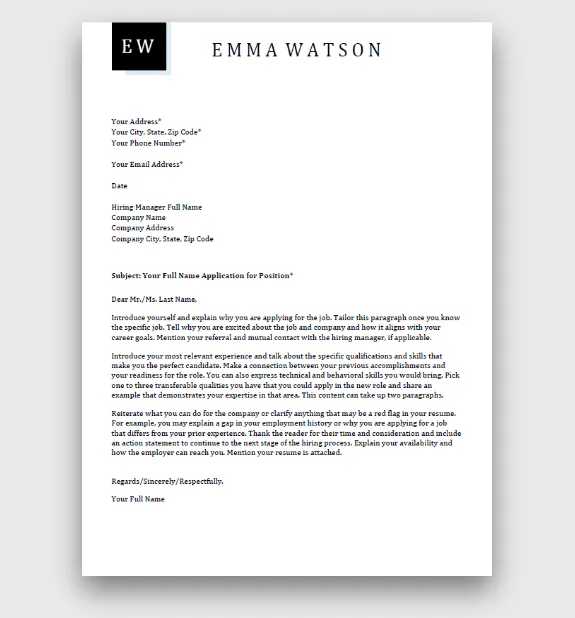
What is a Cover Letter?
A cover letter is a crucial document that accompanies your resume when applying for a job. It serves as your introduction to the hiring manager and provides an opportunity to expand on the information presented in your resume. Unlike a resume, which lists your skills and experience, a cover letter allows you to showcase your personality, express your enthusiasm for the role, and explain why you are a good fit for the company. It’s your chance to make a strong first impression and persuade the employer to consider you for an interview. A well-written cover letter can significantly increase your chances of landing a job.
Why Use a Cover Letter Template
Using a free cover letter template offers several advantages. It provides a structured framework that ensures you include all the essential elements, such as your contact information, a compelling opening, a skills-focused body, and a strong closing. Templates save you time by providing a pre-designed format, allowing you to focus on tailoring the content to each specific job application. They also offer a professional and polished look, enhancing your credibility. Additionally, templates often include examples and guidance, which is particularly helpful if you are new to writing cover letters or seeking to improve your writing skills. A well-chosen template provides a solid foundation for a successful job application.
Key Components of a Cover Letter

A strong cover letter typically comprises several key sections that work together to create a compelling application. Each section serves a specific purpose and contributes to the overall impact of your letter. Understanding these components is essential for crafting an effective cover letter. By including all of the required sections, you will be more likely to pass the Applicant Tracking System (ATS) and get your resume and cover letter to the hiring manager.
Contact Information
Start with your full name, phone number, email address, and optionally, your LinkedIn profile URL. Ensure that your contact information is accurate and professional. This allows the hiring manager to easily reach you if they wish to move forward.
Date
Include the current date, as this helps the hiring manager know when you applied. This information is crucial for record-keeping purposes, as well as for determining when to reach out to you for an interview or update.
Hiring Manager’s Information

If possible, address the hiring manager by name. This shows that you have researched the company and demonstrates your attention to detail. If the name is not available, use a professional salutation like ‘Dear Hiring Manager’.
Salutation
Start your cover letter with a formal salutation. If you know the hiring manager’s name, use ‘Dear Mr./Ms./Mx. [Last Name]’. If not, use ‘Dear Hiring Manager’ or a similar professional greeting. Avoid casual greetings such as ‘Hi’.
Opening Paragraph
The opening paragraph should immediately grab the reader’s attention. State the position you are applying for and where you found the job posting. Briefly mention why you are interested in the role and the company. Keep it concise and engaging.
Highlight Your Skills and Experience

In the body of your cover letter, highlight the skills and experiences that make you a strong candidate for the job. Use specific examples from your previous roles to demonstrate how you have successfully used these skills. Tailor this section to match the job description, emphasizing the qualifications and requirements that the employer has listed. Use keywords from the job description.
Tailor to the Job Description
Carefully review the job description and customize your cover letter to match. Address the specific requirements, skills, and qualifications listed. Use the same language and keywords to show the hiring manager that you understand the role and are a good fit. Customize your cover letter for each job application.
Quantify Your Achievements
Whenever possible, quantify your achievements with numbers and data. For example, instead of saying ‘Improved customer service,’ say ‘Improved customer satisfaction scores by 15%.’ This provides concrete evidence of your capabilities and the value you brought to previous roles. Quantifiable achievements make a strong impression on potential employers.
Showcase Your Personality

While maintaining professionalism, let your personality shine through. Your cover letter should reflect your enthusiasm and passion for the role and the company. Use a tone that is authentic and engaging, and let the hiring manager get a sense of who you are beyond your qualifications. Showing personality helps you stand out from other applicants.
Express Your Enthusiasm
Convey your genuine interest in the position and the company. Explain why you are excited about the opportunity and how your skills align with the company’s goals. Show that you have researched the company and understand its mission and values. Expressing enthusiasm can make a lasting positive impression on the reader.
Closing Paragraph
Summarize your key qualifications and reiterate your interest in the role. Thank the hiring manager for their time and consideration. Briefly mention that you are available for an interview and can be reached at your listed contact information. Keep the closing paragraph concise and impactful.
Call to Action

Include a clear call to action, such as requesting an interview. Make it easy for the hiring manager to take the next step by stating your availability and expressing your enthusiasm to discuss your qualifications further. A strong call to action increases your chances of receiving an interview invitation.
Formal Closing
End your cover letter with a professional closing, such as ‘Sincerely,’ ‘Best regards,’ or ‘Thank you.’ Choose a closing that is appropriate for the context of your letter. A formal closing leaves a final impression of professionalism.
Sign-off
If submitting a physical cover letter, leave space for your signature above your typed name. In digital submissions, simply type your name below the closing. Make sure you can easily be reached and that your contact information is up to date.
Review and Proofread

Before submitting your cover letter, carefully review and proofread it for any errors in grammar, spelling, and punctuation. Have someone else review it as well to catch any mistakes you might have missed. A well-proofread cover letter demonstrates your attention to detail and professionalism. Always double-check and triple-check before submitting.
Common Mistakes to Avoid
Avoiding common mistakes can significantly improve your cover letter. These errors can undermine your application and create a negative impression. Make sure you avoid these mistakes before sending your letter.
Using the Wrong Template
Choose a template that fits the role and company culture. Ensure the template is compatible with the job description. An inappropriate template can make you look unprofessional. Be sure that your chosen template is the appropriate type for the job.
Not Customizing the Letter

Do not use a generic cover letter. Tailor your letter to the specific job and company. Generic letters show a lack of interest and attention to detail. Always personalize your cover letter to the role to show your interest.
Typos and Grammatical Errors
Proofread your cover letter carefully for any errors. Typos and grammatical errors make you look careless. Use spell check and grammar tools, and have someone else review your letter. Always double-check before submitting.
Not Addressing the Hiring Manager
Always address the hiring manager by name if possible. If you cannot find the name, use a professional greeting. Not addressing the hiring manager shows a lack of effort and may hinder your chances of getting an interview. Research the hiring manager and company prior to writing your cover letter.
Where to Find Free Cover Letter Templates
Numerous online resources offer free cover letter templates. These templates are designed to provide a starting point for your job application. Knowing where to look can save you time and effort in creating a cover letter.
Online Template Resources
Several websites offer a wide variety of free cover letter templates. Look for templates that are compatible with your word processor or online editor. Sites like Microsoft, Google Docs, and various job boards are good places to start. Check for various formats that best meet your needs.
Microsoft Word Templates
Microsoft Word provides a range of free cover letter templates. You can access these templates directly within the program. These templates offer a convenient option for those who prefer to work within the Microsoft Office suite. This provides a simple method to produce an exceptional cover letter.
Google Docs Templates
Google Docs also offers free cover letter templates. You can access these templates by creating a new document and selecting ‘From template.’ Google Docs templates are a great choice if you prefer a cloud-based word processor. They provide a simple and free way to start your cover letter.
Tips for Customizing Your Template
Customizing your cover letter template is essential for creating a unique and compelling document. You can do several things to make your cover letter stand out.
Match the Tone
Adapt the tone of your cover letter to match the job and company culture. Use a formal tone for traditional industries and a more casual tone for tech startups. Ensure your writing style is appropriate for the role you seek.
Use Action Verbs
Start sentences with strong action verbs to make your letter more dynamic. Action verbs show the hiring manager what you have accomplished. For example, use verbs like ‘managed,’ ’led,’ ‘achieved,’ and ‘developed.’ This shows accomplishments.
Focus on Relevant Skills
Highlight the skills and experiences that are most relevant to the job description. Tailor your letter to each specific application, and emphasize the qualifications the employer is seeking. This will make you a more appealing candidate. Make certain to use keywords from the job listing.
Formatting and Design
The formatting and design of your cover letter are important for creating a professional look and feel. Choose a clean, easy-to-read design to enhance readability.
Font and Font Size
Use a professional font, such as Times New Roman, Arial, or Calibri. Keep the font size between 10 and 12 points for readability. Make sure the font is easy to read. This creates a professional and polished appearance.
Margins and Spacing
Set the margins to one inch on all sides. Use single spacing within paragraphs and double spacing between paragraphs. Proper spacing and margins make your cover letter easy to read.
File Format
Save your cover letter as a PDF file to preserve the formatting. PDFs can be opened on any device and ensure that your letter looks as intended. PDFs also ensure that your formatting does not change.